FalconPay Global Payin API
Complete developer reference for integrating FalconPay payment processing into your application. RESTful APIs with enterprise-grade security, real-time processing, and multi-region support.
Base URL: https://api.falconpay.io/v1/payin · All requests must use HTTPS.
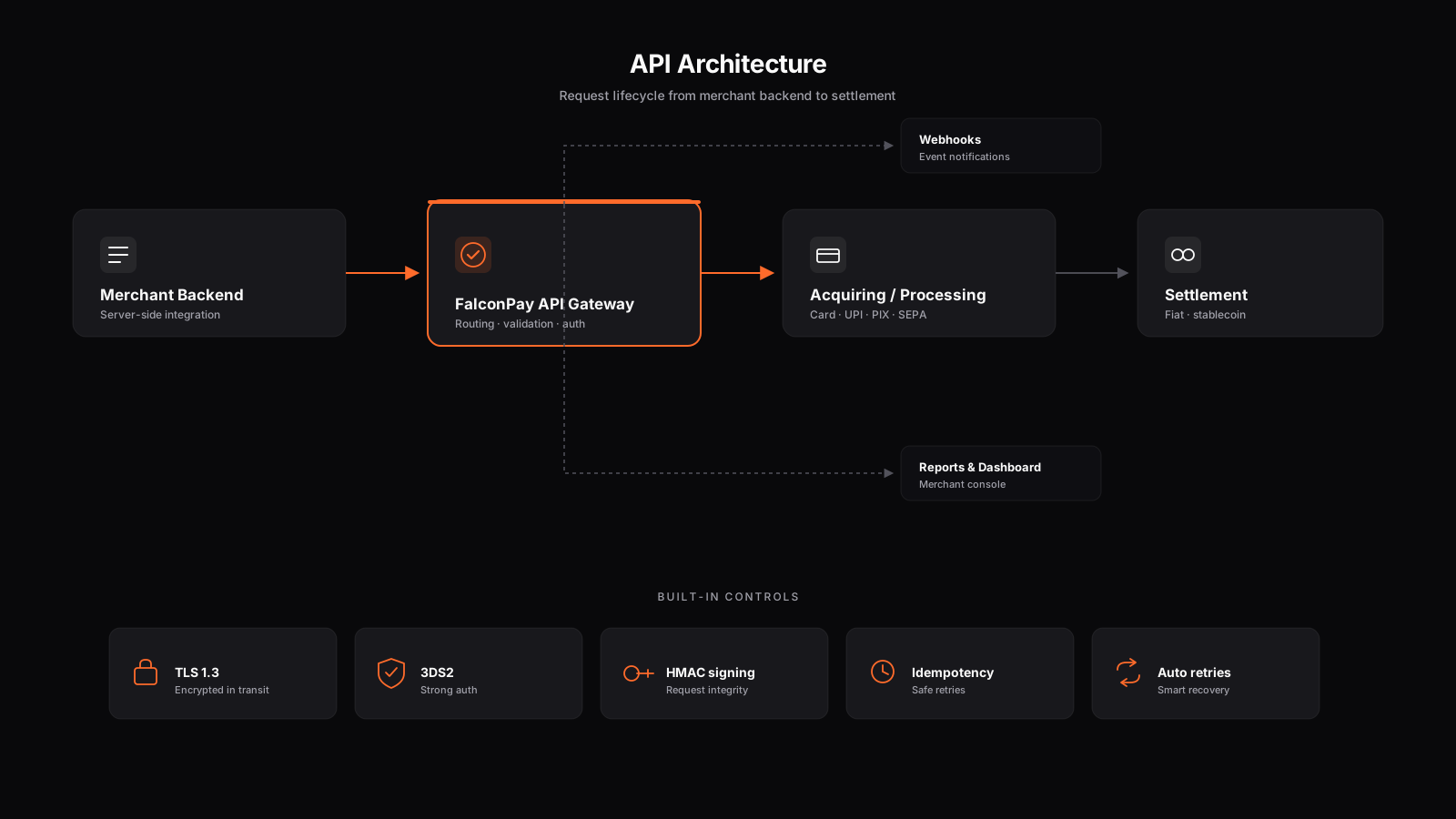
Table of Contents
Key Features
- Multi-country payment processing — Europe, India, LATAM, Brazil
- Real-time order status tracking — Instant payment status updates
- Webhook notifications — Signed real-time event delivery
- HMAC-SHA512 authentication — Enterprise-grade request signing
- RESTful design — Standard HTTP methods and JSON payloads
- Stablecoin settlement — USDT/USDC across multiple chains
Authentication
All API requests require authentication using a custom header-based system with HMAC-SHA512 signature verification. This ensures every request is cryptographically verified and protected against replay attacks.
Authentication Headers
| Header | Required | Description |
|---|---|---|
X-Payin-Apikey | ✓ Yes | Your unique merchant API key |
X-Payin-Payload | ✓ Yes | Base64-encoded payload containing timestamp and request body |
X-Payin-Signature | ✓ Yes | HMAC-SHA512 hex signature of the payload using your API secret |
Content-Type | ✓ Yes | Must always be application/json |
Authentication Process
Construct payload — Create a JSON object with timestamp (current Unix ms) and body (your request body).
Base64 encode — Serialize the payload to JSON string, then Base64 encode it.
Sign with HMAC-SHA512 — Generate signature using your API_SECRET as the key and the Base64 string as the message.
Attach headers — Send X-Payin-Apikey, X-Payin-Payload, and X-Payin-Signature on every request.
Payload Structure
{
  "timestamp": 1751294199081,
  "body": {
    "amount": 510.50,
    "countryCode": "IN",
    "merchantRecognitionId": "order_xyz_001"
  }
}
Complete Authentication Example — Python
import hmac, hashlib, base64, json, time, requests

API_KEY    = "fp_live_your_api_key"
API_SECRET = "fp_secret_your_secret"

def build_headers(body: dict) -> dict:
    payload = json.dumps({
        "timestamp": int(time.time() * 1000),
        "body": body
    })
    encoded = base64.b64encode(payload.encode()).decode()
    sig = hmac.new(
        API_SECRET.encode(),
        encoded.encode(),
        hashlib.sha512
    ).hexdigest()
    return {
        "X-Payin-Apikey":     API_KEY,
        "X-Payin-Payload":   encoded,
        "X-Payin-Signature": sig,
        "Content-Type":      "application/json"
    }
Security: Never expose your API_SECRET in client-side code, repositories, or logs. The timestamp prevents replay attacks — requests older than 5 minutes are rejected.
Order APIs
Create and track payment orders. These endpoints handle the core payment flow from initiation to completion.
Create Order
Initiates a new payment order. Returns a payment URL or order details for the customer to complete the payment.
Request Body
{
  "amount": 510.50,
  "countryCode": "IN",
  "merchantRecognitionId": "your_unique_order_id"
}
Parameters
| Parameter | Type | Required | Description |
|---|---|---|---|
amount | number | ✓ Yes | Payment amount. Supports decimals (e.g., 510.50) |
countryCode | string | ✓ Yes | ISO 3166-1 alpha-2 country code (e.g., "IN", "GB", "BR") |
merchantRecognitionId | string | ✓ Yes | Your unique order identifier — used to reference this order later |
Response
{
  "success": true,
  "orderId": 12345,
  "merchantRecognitionId": "your_unique_order_id",
  "amount": 510.50,
  "countryCode": "IN",
  "status": "pending",
  "paymentUrl": "https://pay.falconpay.io/order/12345",
  "createdAt": "2025-07-10T10:30:00Z"
}
Get Order Status
Retrieves the current status and full details of an existing payment order.
Request Body
{
  "searchBy": "orderId",
  "searchValue": 12345
}
Parameters
| Parameter | Type | Required | Description |
|---|---|---|---|
searchBy | string | ✓ Yes | "orderId" or "merchantRecognitionId" |
searchValue | string / number | ✓ Yes | The order ID or merchant recognition ID to search for |
Response
{
  "success": true,
  "orderId": 12345,
  "merchantRecognitionId": "your_unique_order_id",
  "amount": 510.50,
  "countryCode": "IN",
  "status": "completed",
  "transactionId": "txn_abc123def456",
  "paymentMethod": "UPI",
  "createdAt": "2025-07-10T10:30:00Z",
  "completedAt": "2025-07-10T10:31:42Z"
}
Order Status Values
| Status | Description |
|---|---|
pending | Order created, awaiting customer payment |
processing | Payment initiated, awaiting confirmation |
completed | Payment successfully received and confirmed |
failed | Payment failed or was declined |
expired | Payment window timed out without completion |
refunded | Payment was refunded to the customer |
Merchant APIs
Manage your merchant account settings, webhook configuration, and transaction history.
Set Webhook URL
Configures the HTTPS endpoint where FalconPay will deliver real-time payment event notifications.
Request Body
{
  "webhookUrl": "https://yourapp.com/webhooks/falconpay"
}
Parameters
| Parameter | Type | Required | Description |
|---|---|---|---|
webhookUrl | string | ✓ Yes | Valid HTTPS URL to receive webhook POST requests |
Webhook URL must use HTTPS and be capable of receiving POST requests. Verify ownership by checking the HMAC-SHA512 signature on each delivery.
Get Webhook URL
Retrieves the currently configured webhook URL for your merchant account.
Request
No request body required. Authentication headers still required.
Response
{
  "success": true,
  "webhookUrl": "https://yourapp.com/webhooks/falconpay",
  "status": "active",
  "lastDelivery": "2025-07-10T08:22:11Z"
}
Get Order History
Retrieves a paginated list of orders for your merchant account within a specified date range.
Request Body
{
  "from":   "2025-01-01",
  "upto":   "2025-07-10",
  "pageNo": "1"
}
Parameters
| Parameter | Type | Required | Description |
|---|---|---|---|
from | string | ✓ Yes | Start date in YYYY-MM-DD format |
upto | string | ✓ Yes | End date in YYYY-MM-DD format |
pageNo | string | ✓ Yes | Page number for pagination, starting from "1" |
Get Supported Countries
Returns the complete list of countries supported by FalconPay with their available features.
This endpoint does not require authentication headers. It is publicly accessible.
Response
{
  "success": true,
  "countries": [
    {
      "code":     "IN",
      "name":     "India",
      "payIn":    true,
      "payOut":   true,
      "currency": "INR"
    },
    {
      "code":     "BR",
      "name":     "Brazil",
      "payIn":    true,
      "payOut":   true,
      "currency": "BRL"
    }
  ]
}
Error Handling
FalconPay uses standard HTTP status codes to indicate the success or failure of each request. All error responses follow a consistent JSON structure.
HTTP Status Codes
| Code | Status | Typical Cause |
|---|---|---|
| 200 | Success | Request processed successfully |
| 400 | Bad Request | Invalid parameters, missing required fields, or malformed JSON |
| 401 | Unauthorized | Invalid API key, bad signature, or expired timestamp |
| 404 | Not Found | Resource not found or invalid endpoint path |
| 500 | Server Error | Internal server error — contact support if persistent |
Error Response Format
{
  "success":   false,
  "error":     true,
  "code":      "INVALID_SIGNATURE",
  "message":   "Request signature verification failed",
  "timestamp": "2025-07-10T10:30:00Z"
}
Common Error Codes
| Error Code | Description | Resolution |
|---|---|---|
INVALID_SIGNATURE | HMAC signature mismatch | Verify signing key and Base64 encoding |
EXPIRED_TIMESTAMP | Request timestamp too old (> 5 min) | Use current system time in milliseconds |
INVALID_API_KEY | API key not found or inactive | Check API key in your merchant dashboard |
INVALID_AMOUNT | Amount is zero, negative, or missing | Provide a positive numeric amount |
UNSUPPORTED_COUNTRY | Country code not in supported list | Use /merchant/countries to check valid codes |
DUPLICATE_ORDER | Merchant recognition ID already used | Use a unique merchantRecognitionId per order |
Webhook Notifications
When a webhook URL is configured, FalconPay sends signed POST requests to your endpoint for all significant payment events.
Event Types
| Event | Trigger |
|---|---|
payment.pending | Order created, awaiting customer payment |
payment.processing | Payment initiated by customer |
payment.completed | Payment confirmed and funds received |
payment.failed | Payment declined or processing error |
payment.expired | Payment window closed without completion |
payment.refunded | Funds returned to customer |
Webhook Payload
{
  "event":                 "payment.completed",
  "orderId":              12345,
  "merchantRecognitionId": "your_unique_order_id",
  "amount":               510.50,
  "currency":             "INR",
  "status":               "completed",
  "transactionId":        "txn_abc123def456",
  "paymentMethod":         "UPI",
  "timestamp":            "2025-07-10T10:31:42Z"
}
Security: Always verify the X-Payin-Signature header on every webhook delivery using HMAC-SHA512. Never process a webhook without verifying its signature.
Verifying Webhook Signatures — Python
import hmac, hashlib
from flask import request, abort

API_SECRET = "fp_secret_your_secret"

def verify_webhook(req):
    received_sig = req.headers.get("X-Payin-Signature", "")
    payload      = req.headers.get("X-Payin-Payload", "")

    expected_sig = hmac.new(
        API_SECRET.encode(),
        payload.encode(),
        hashlib.sha512
    ).hexdigest()

    if not hmac.compare_digest(received_sig, expected_sig):
        abort(401, "Invalid webhook signature")

    return True

# In your Flask route:
@app.route("/webhooks/falconpay", methods=["POST"])
def webhook_handler():
    verify_webhook(request)
    data = request.get_json()
    # Process event...
    return "", 200
Integration Guide
Best Practices
- Always use HTTPS — All API requests must be made over TLS.
- Store credentials securely — Use environment variables or a secrets manager. Never hardcode API keys.
- Handle timeouts gracefully — Set a 30-second timeout on API calls. Implement exponential backoff for retries.
- Use webhooks for status — Don't poll order status; use webhooks for real-time updates.
- Log all interactions — Log request/response pairs (excluding secrets) for debugging and audit.
- Idempotent order IDs — Use unique, meaningful
merchantRecognitionIdvalues to prevent duplicates. - Test in sandbox first — Validate your full integration before going to production.
Rate Limiting
Rate limits are defined per your merchant agreement. The following headers are returned on every response:
| Header | Description |
|---|---|
X-RateLimit-Limit | Maximum requests per window |
X-RateLimit-Remaining | Remaining requests in current window |
X-RateLimit-Reset | Unix timestamp when the window resets |
Quick Start: The fastest path to integration is: (1) request credentials → (2) run the Python example → (3) test in sandbox → (4) configure webhooks → (5) go live.
Complete Integration Checklist
- Received API key and secret from FalconPay team
- Implemented HMAC-SHA512 request signing
- Tested
POST /order/createin sandbox - Tested
POST /order/statuspolling - Configured HTTPS webhook endpoint
- Verified webhook signature validation
- Handled all order status transitions
- Implemented retry logic with exponential backoff
- Reviewed error handling for all error codes
- Confirmed production credentials with FalconPay
Support
Technical Support: [email protected] — Include your merchant ID, request/response details, and error timestamps for fastest resolution.
Contact Channels
| Channel | Contact | Response Time |
|---|---|---|
| Technical Support | [email protected] | < 12 hours |
| Sales & Onboarding | [email protected] | < 4 hours |
| Compliance | [email protected] | < 24 hours |
| Security | [email protected] | < 2 hours |
When Contacting Support, Include:
- Your Merchant ID
- The full request body (redact API secrets)
- The full response body including error codes
- Timestamps of the affected requests
- Steps to reproduce the issue
- SDK / language and version you are using
Ready to go live? Once sandbox testing is complete, email [email protected] with your integration summary to receive production credentials within 24 hours.